How SendTruss works
SendTruss sends email for your customers from inside your platform. Your backend talks to our API with one key. We send each email from your own domain, and we tell your backend what happened to it with webhooks. Your team sets up the domain, the keys and the templates once, on our console.
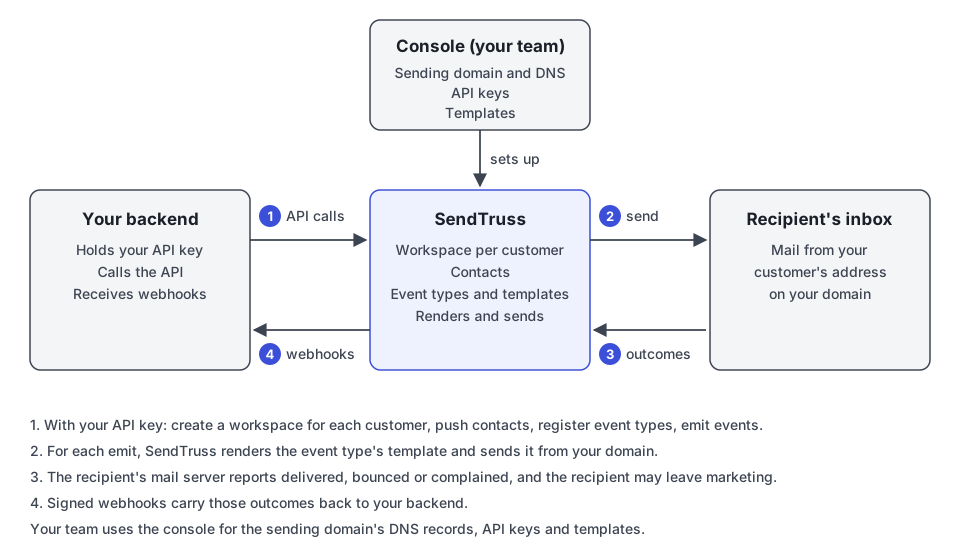
The flow, step by step
Section titled “The flow, step by step”Your team sets things up on the console. Someone on your team signs in, adds your sending domain and publishes the DNS records the console shows. They create an API key for your backend. They build a template for each kind of email you send, or your code saves templates through the API. All of this belongs to your platform as a whole, not to any one customer.
1. Your backend calls the API. Every request carries your API key. With it, your backend:
- creates a workspace for each of your customers, named by your own id for that customer (Platforms and workspaces);
- pushes each customer’s contacts into their workspace, by your own id for each person (Contacts, attributes and consent);
- registers the event types your platform emits, such as
booking.created, each with a small schema (Event types and schemas); - emits an event when something happens, naming the workspace, the event type, the recipient and the event’s data (Emitting events).
2. We render and send. When an event type has a template, each emit renders it with the event’s data and the contact’s attributes, and we send the email from your domain, under a subdomain of its own for each workspace (Templates, Sending domain and DNS). An event type with no template records the event and sends nothing.
3. The recipient’s mail server answers. It tells us whether the email was delivered, bounced or marked as spam. A recipient can also leave marketing through the link in a marketing email.
4. Webhooks tell your backend. Each of those outcomes comes back to your backend as a signed webhook, retried until your endpoint takes it (Webhooks). Changes your own backend made through the API don’t come back, since you already know about them.
What a workspace sees
Section titled “What a workspace sees”Each workspace is one of your customers. Their contacts, their events and their email are theirs alone, and a key can only reach the workspaces of its own platform. The domain, the keys, the event types and the templates are yours and shared by every workspace, so booking.created means the same thing for every customer and every workspace sends the same template for it.
Where to go next
Section titled “Where to go next”- The Quickstart takes you from your first console login to a delivered email.
- Coming from Mailchimp maps a Mailchimp sync onto SendTruss piece by piece.
- The API reference lists every operation.